Our goal was to increase sales for Butterfly World by updating the site to reflect easy-to-purchase e-tickets.
Project Title
- Butterfly World Site Redesign
Roles
- UI Designer
- UX Researcher
Deliverables
- User Proto Persona/User Persona
- Survey Questions and Results
- User Interviews
- Problem Statement
- Heuristic Evaluation
- Ideation Documentation
- Competitor Analysis
- SWOT Analysis
- Storyboard
- User Flow
- Card Sort/Site Map
- Mood Board
- Style Tile
- Low-Fi Wireframe
- High-Fi Wireframe
- Low-Fi Prototype
- High-Fi Prototype
- Coded Github Website
- User Testing with User Testing Plan and Results
Further Mentions
- 6 Team Members
- Programs used: Figma, Figjam, and Photoshop
Digital Medium
- Website Redesign

Project Overview
Users found it was a deterrent to go to Butterfly World due to the omission of e-tickets so the team decided to solve this problem. The navigation was also confusing, the information hierarchy was misplaced, and the UI was in need of an upgrade.
Style & Imagery

#66448B

#3F205E

#85B7EF

#52BDD9

#EDD597

Aa
Raleway 32pt
Barlow 18 pt
Style direction: clean, enchanting, inviting, irredescent
Empathy
Team Kaleidoscope created a proto persona after making annotations, conducted surveys and user interviews.
Define
The team had to flesh out the user persona, synthesize data garnered from the surveys and user interviews, and define the project's problem statement.
Ideate
In the ideation phase, the team used the Affinity Diagram to develop ideation documentation that would help them hone in on the main concentrations for the redesign. They then developed a storyboard surrounding their user persona and a user flow.
Prototype
The prior design thinking phases culminated in low-fi wireframes and from there, high-fidelity wireframes. Both became clickable prototypes that helped the team in their testing.
Testing
The team tested the low-fi prototype which aided them in constructing a better high-fidelity prototype.
Annotations
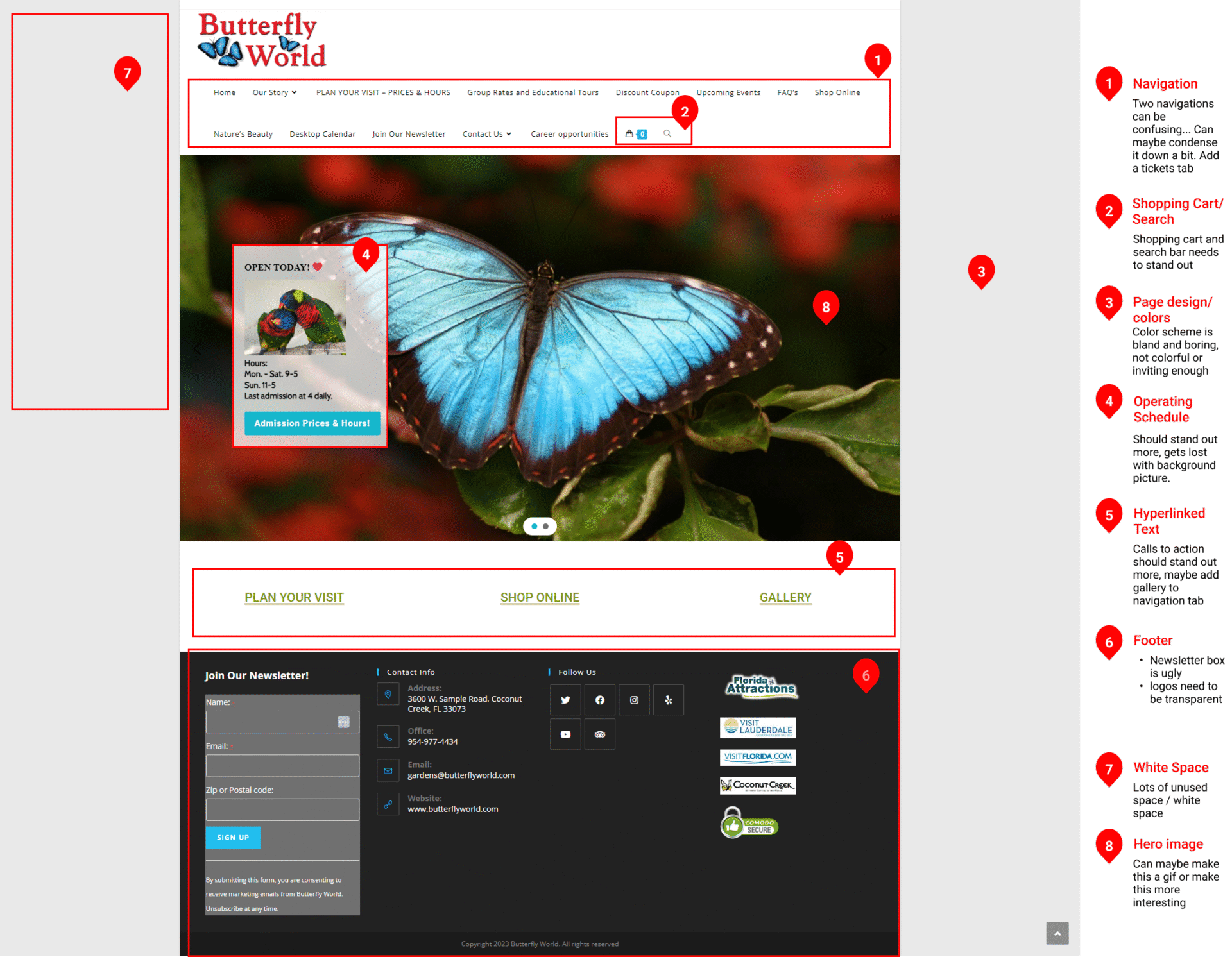
The team came together to annotate all pages that were subject to the redesign by spotting common issues a user would have on the Butterfly World website. Issues included excessive sidebar space and hyperlinked text for options that should contain an image or an icon. You can see the Heuristic Evaluation that a teammate conducted here.

Surveys & User Interviews
As a group, we created interview questions. Another teammate led the survey questions, but all members contributed to the questionnaire.
In total, we had 8 user interviews with each member participating in the user interviews and 19 survey responses.
We discovered from the survey responses and our user interviews that most people would attend a butterfly sanctuary with their families.
We also discovered that most of our interviewees and survey responders wanted to see e-tickets available.
When asked about the official website’s user interface, the color palette most users wanted to see was blue and purple. Yellow was a third contender so the researchers decided to combine the color palette from the data to create the color scheme.
User Persona
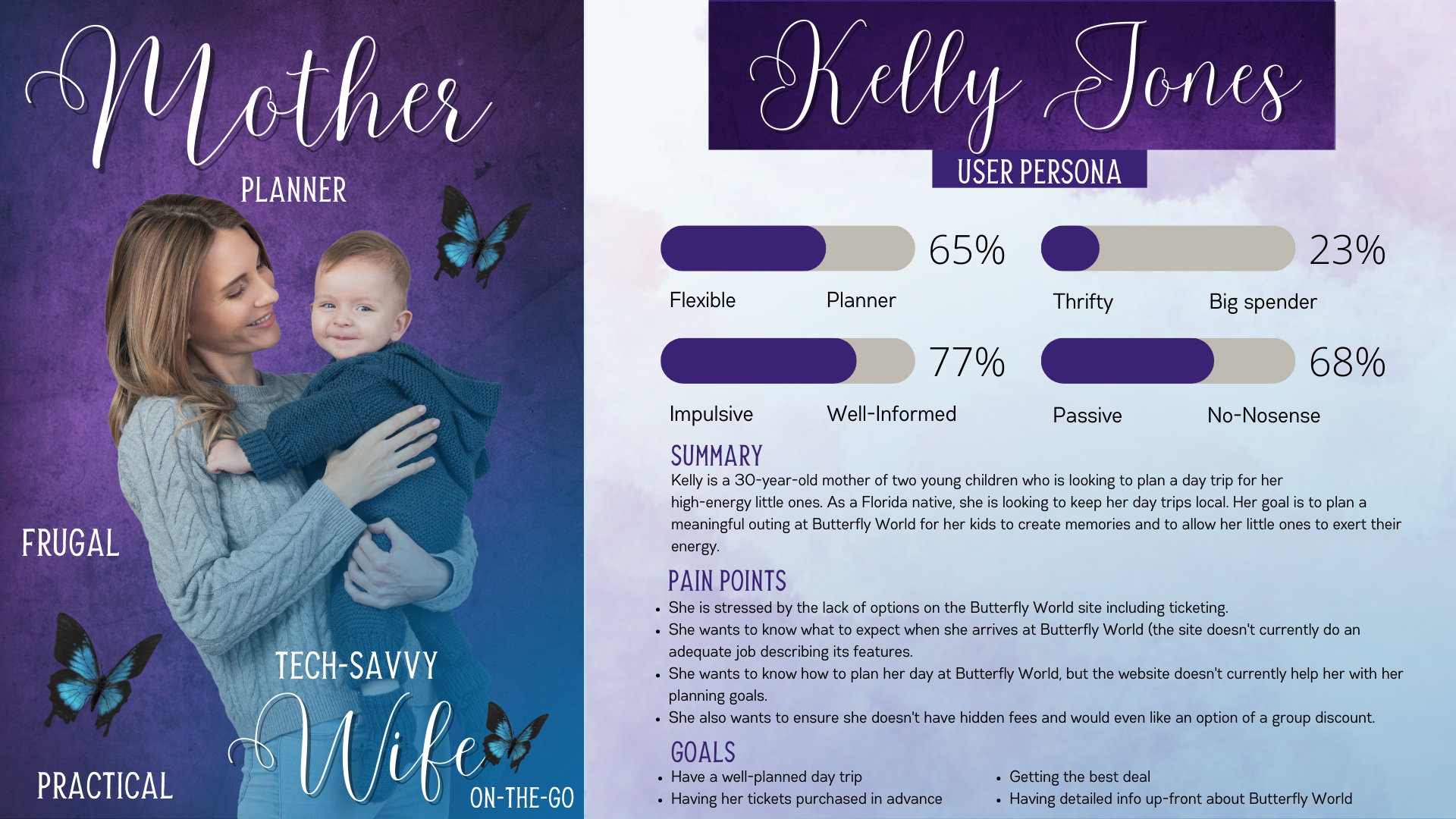
From the data gathered, the tea, developed the user persona, Kelly Jones. Sarah was in charge of synthesizing the data for this task and creating the graphic.

Problem Statment
Kelly Jones is a tech savvy mother of two who needs a simple and effective way to purchase tickets and locate information on the Butterfly World website because she wants to create lasting, stress-free memories with her two toddlers in this family friendly environment.

Storyboard
From there the team synergized together, creating a problem and solution for Kelly. Two teammates then went from there to flesh out the Storyboard.
User Flow
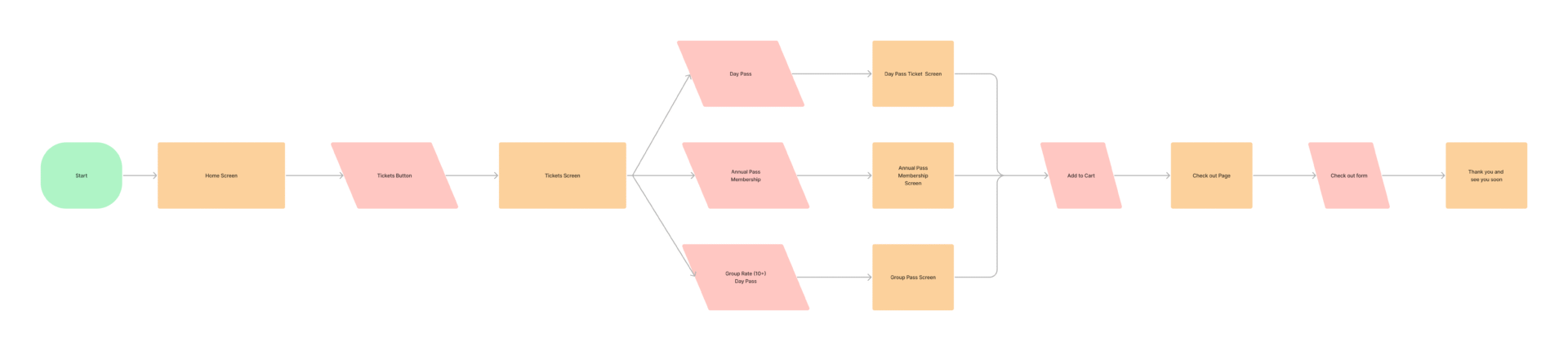
A teammate created the user flow which would show the typical journey of a user perusing the site with the intention of purchasing a ticket.
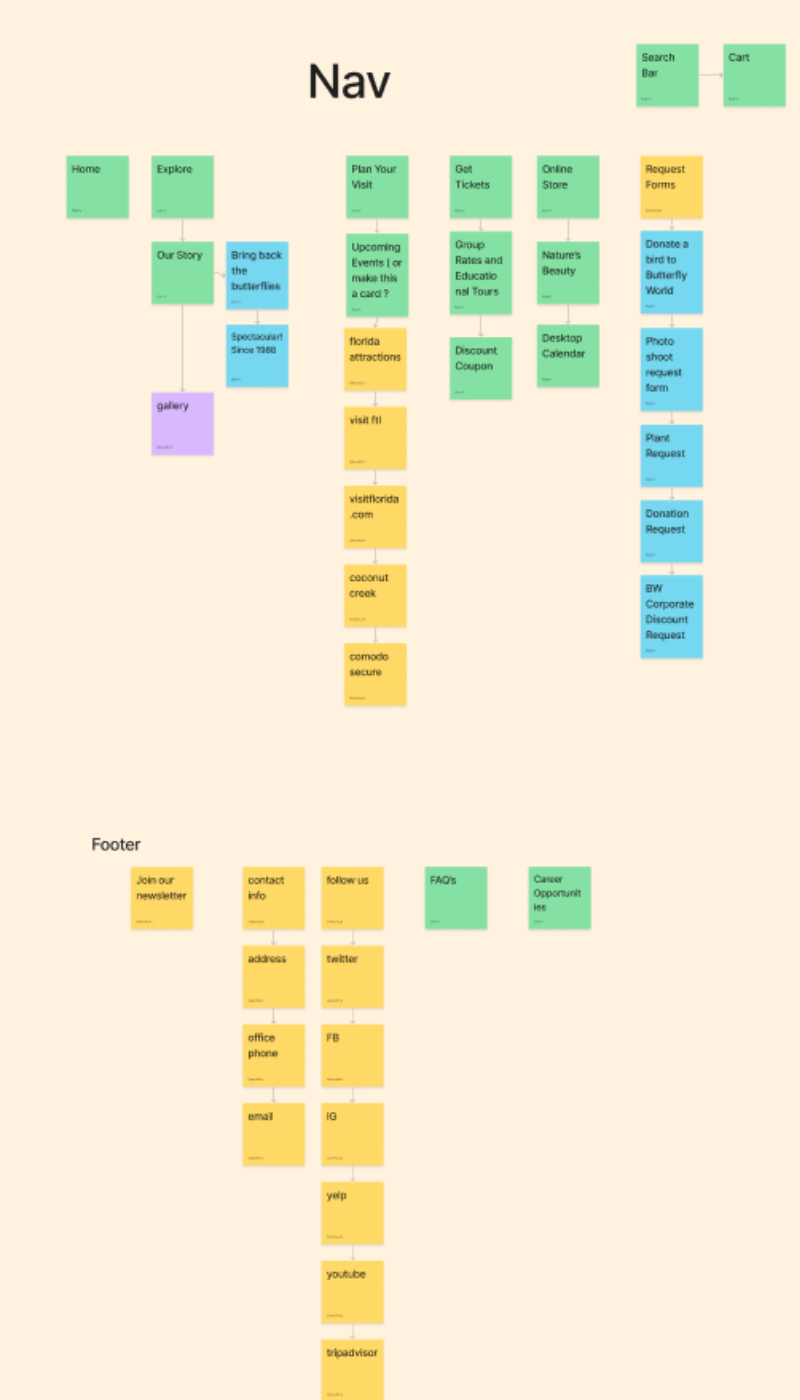
Site Map
A card sort was performed by a teammate and from there, the sitemap was revised based on easier navigation and clearer hierarchy.


Mood Board & Style Tile
Next, Sarah created the Mood Board with a teammate showcasing a collage of images, website layouts, and color palettes that made sense for the website redesign given the user data from their research phase. Sarah then finalized the UI thought process on a UI Style Tile.
Low-Fidelity Wireframes and Prototype
Sarah and two other teammates created low-fi wireframes of the web pages intended for the redesign. Several teammates collaborated to turn these concepts into a mid-fidelity prototype.

User Testing
Early User Testing indicated that users had difficulty locating the map of the park. The search bar was omitted to make more room in the nav bar and replaced by a map icon. Users also indicated the need for seeing location info and hours of operation easier so this was fixed on the prototype.
High Fidelity Wireframes
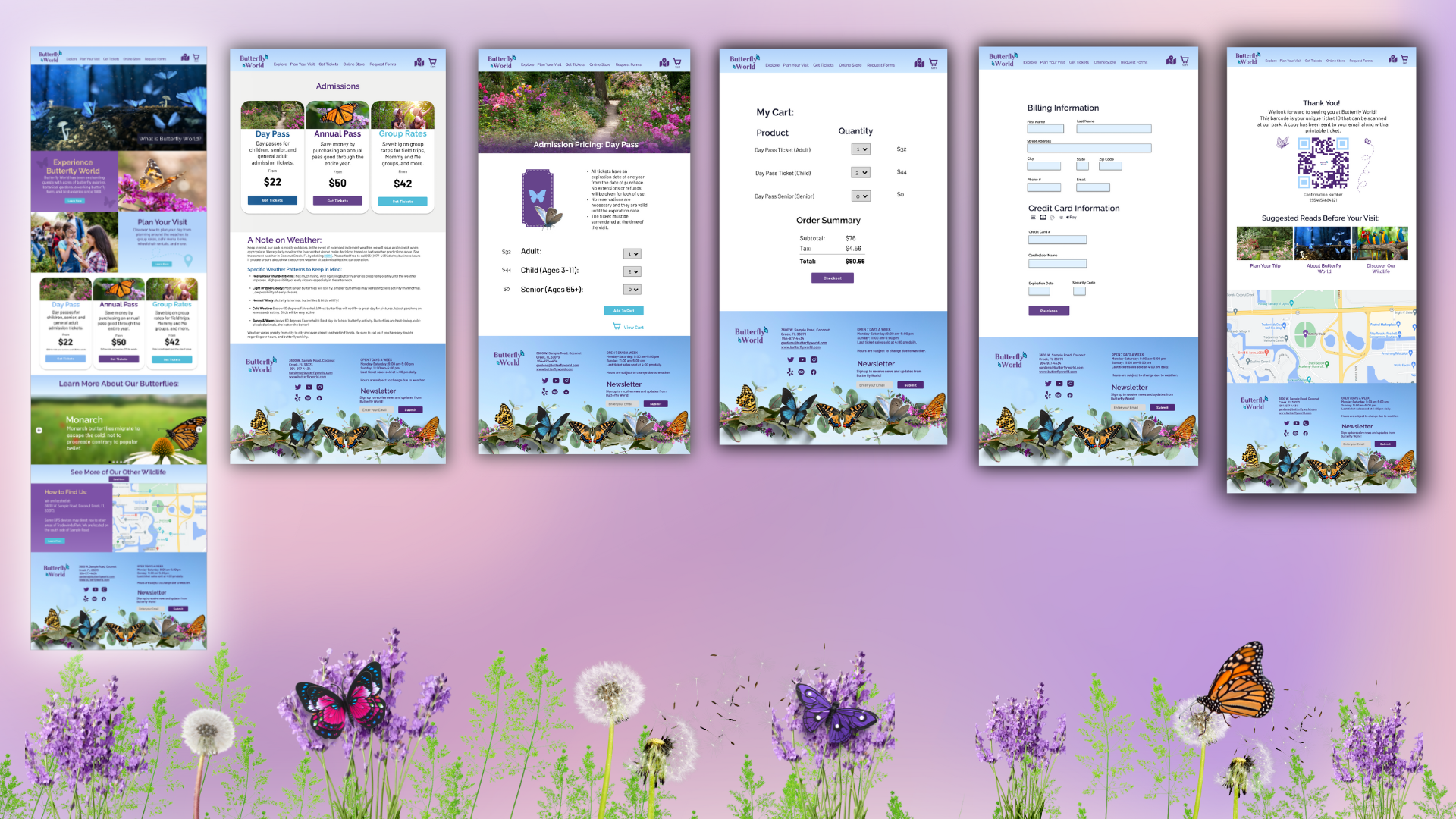
Sarah used the mid-fi prototype, the UI Style Tile, and the results of the user interviews as her guide as she fashioned together the high-fidelity wireframe.
She used the data from the user interviews to give the homepage clear and concise messaging complete with original copy.
The former Butterfly World website did not indicate what Butterfly World even was at first which left users confused.
Sarah created an animated, clickable slider in the hero image area which would lead the user to different options including a clickable slider that leads to the ticketing page for easy access.
The team noticed a trend with users requesting butterfly factoids, so Sarah prototyped a butterfly factoid slider with composite images of butterflies with a blurred and slightly darkened background for easier readability of text on the slider.
Final Usability Testing
In the Final Usability Testing, a teammate was in charge of setting up the plan and subsequent testing questions. Sarah conducted three final usability testings with three different users and a teammate conducted one other usability test.
Users appreciated the revamped site after seeing the original Butterfly World site.
Some key points included:
- Users felt like the revamped site was more transparent with their ticketing.
- 3 out of 4 users were unable to purchase tickets on the former site but were able to easily purchase tickets on the revamped site.
- A comment, “If these were two different Butterfly Worlds, I would want to go to the second one.” (The second site was the revamped site.)
- Another user exclaimed, “The second site makes me actually want to go to Butterfly World!”
For final iterations, several users complained that the animated slider was too fast and needed to be slowed down.
Also in the slider, there was a slide that visually displayed ticketing prices, but all tickets had congruent looks which confused users since each ticket represented a different offer so Sarah changed the slide accordingly.
Sarah’s final Usability Testing Notes are here.
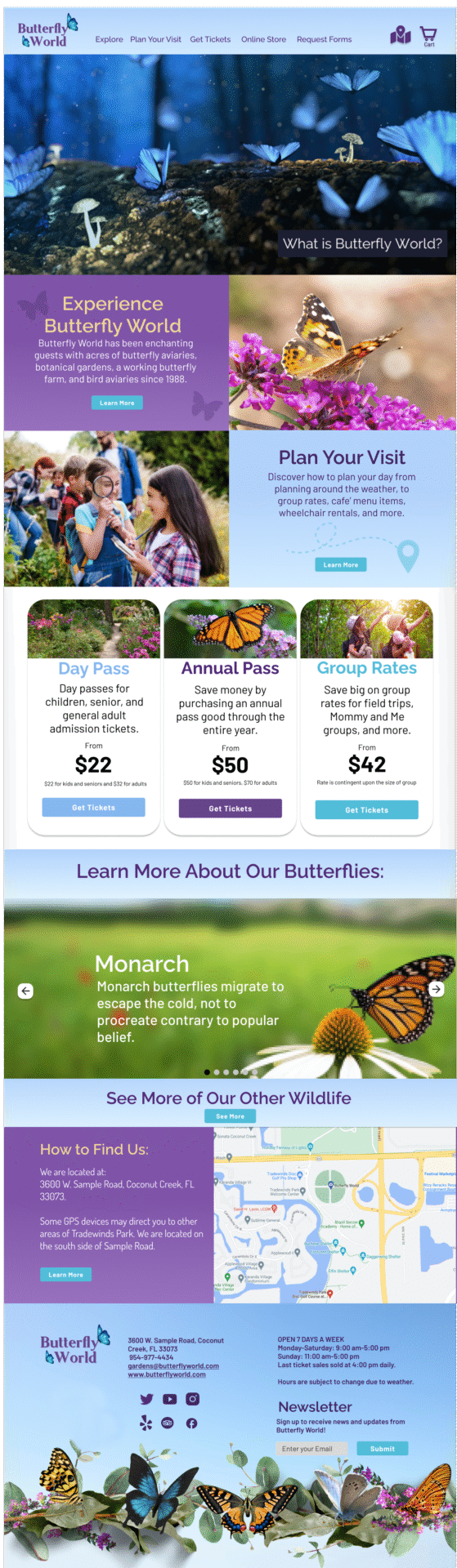
See a viewable prototype by clicking on the computer screen or button. (Note, although it was prototyped correctly, there was a software glitch with the menu.)
The team worked on developing the desktop prototype with Github.
